Your Ad Here
Click to play
x
Controls

Controls

Go back, close menu, open game menu

  • Keyboard - [ Esc / X / Numpad - ]
  • Gamepad - [ Cancel (East) ]

Click or press menu buttons

  • Keyboard - [ Submit (Enter) / Space ]
  • Gamepad - [ Submit (South) ]

Navigate menu buttons or sudoku board

  • Keyboard - [ WASD / Arrow keys ]
  • Gamepad - [ D-pad / Any stick ]

Switch focus between menu buttons and sudoku board

  • Keyboard - [ Ctrl / K / Numpad (/) ]
  • Gamepad - [ West / Select / Left shoulder]

Toggle pencil or note

  • Keyboard - [ Tab / N / Numpad + ]
  • Gamepad - [ North / Right shoulder ]

Input/note number in cell

  • Keyboard - [ Number or Numpad keys 123456789 ]

Erase/empty cell

  • Keyboard - [ Number or Numpad key 0 / Backspace ]

Pause game

  • Keyboard - [ ` / P / Numpad * ]
  • Gamepad - [ Start ]

Fullscreen / window mode

  • Keyboard - [ F11 ]
Shaolin Sudoku

Shaolin Sudoku

Shaolin Sudoku
Click to play
This game is not available on mobile.
rotate phone

Shaolin Sudoku: Puzzle Mastery Meets Martial Zen

Picture a quiet dojo, crisp scrolls, and a grid that tests every logical instinct. Shaolin Sudoku blends classic 9×9 Sudoku with a sleek 2D aesthetic, delivering a solo, 1 Player showdown that rewards precision. Each mistake chips away at your standing, so you’ll feel the rush of every correct placement. It’s not just a brain teaser; it’s a disciplined grind that sharpens focus while you chase flawless runs.

Mechanics

Controls are stripped down to essentials, letting you stay locked on the puzzle without fumbling through menus. Whether you’re on keyboard or gamepad, every action maps to a single, intuitive button combo.

  • Controls Go back, close menu, open game menu Keyboard - [ Esc / X / Numpad - ] Gamepad - [ Cancel (East) ]
  • Click or press menu buttons Keyboard - [ Submit (Enter) / Space ] Gamepad - [ Submit (South) ]
  • Navigate menu buttons or sudoku board Keyboard - [ WASD / Arrow keys ] Gamepad - [ D-pad / Any stick ]
  • Switch focus between menu buttons and sudoku board Keyboard - [ Ctrl / K / Numpad (/) ] Gamepad - [ West / Select / Left shoulder]
  • Toggle pencil or note Keyboard - [ Tab / N / Numpad + ] Gamepad - [ North / Right shoulder ]
  • Input/note number in cell Keyboard - [ Number or Numpad keys 123456789 ]
  • Erase/empty cell Keyboard - [ Number or Numpad key 0 / Backspace ]
  • Pause game Keyboard - [ ` / P / Numpad * ] Gamepad - [ Start ]
  • Fullscreen / window mode Keyboard - [ F11 ]
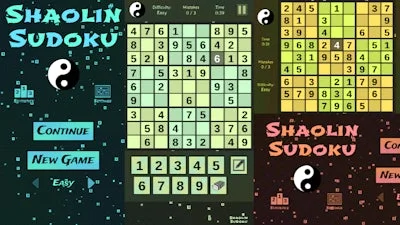
Shaolin Sudoku Gameplay

Strategy

Start by scanning each row, column, and 3×3 block for the “single‑candidate” numbers. Those low‑hanging fruits lock down the board fast and give you momentum. Once the easy cells are gone, shift to “candidate elimination”: pencil in all possible digits, then look for hidden pairs or triples that force a placement. Remember, the game limits mistakes, so use the pencil mode aggressively to test theories without committing. As you climb difficulty tiers, the puzzle density spikes; keep an eye on symmetry patterns that often hint at the next forced move. Mastering the rhythm between aggressive fills and cautious note‑taking is the key to beating every level.

Ready to prove your mental martial arts? Grab PlayHop’s polished 2D engine, fire up Shaolin Sudoku, and start carving perfect grids today.


Instructions:

Controls

Go back, close menu, open game menu

  • Keyboard - [ Esc / X / Numpad - ]
  • Gamepad - [ Cancel (East) ]

Click or press menu buttons

  • Keyboard - [ Submit (Enter) / Space ]
  • Gamepad - [ Submit (South) ]

Navigate menu buttons or sudoku board

  • Keyboard - [ WASD / Arrow keys ]
  • Gamepad - [ D-pad / Any stick ]

Switch focus between menu buttons and sudoku board

  • Keyboard - [ Ctrl / K / Numpad (/) ]
  • Gamepad - [ West / Select / Left shoulder]

Toggle pencil or note

  • Keyboard - [ Tab / N / Numpad + ]
  • Gamepad - [ North / Right shoulder ]

Input/note number in cell

  • Keyboard - [ Number or Numpad keys 123456789 ]

Erase/empty cell

  • Keyboard - [ Number or Numpad key 0 / Backspace ]

Pause game

  • Keyboard - [ ` / P / Numpad * ]
  • Gamepad - [ Start ]

Fullscreen / window mode

  • Keyboard - [ F11 ]
Customise Consent Preferences Close

We use cookies to help you navigate efficiently and perform certain functions. You will find detailed information about all cookies under each consent category below.

The cookies that are categorised as "Necessary" are stored on your browser as they are essential for enabling the basic functionalities of the site.

Always Active

Necessary cookies are required to enable the basic features of this site, such as providing secure log-in or adjusting your consent preferences. These cookies do not store any personally identifiable data.

Functional cookies help perform certain functionalities like sharing the content of the website on social media platforms, collecting feedback, and other third-party features.

Analytical cookies are used to understand how visitors interact with the website. These cookies help provide information on metrics such as the number of visitors, bounce rate, traffic source, etc.

Advertisement cookies are used to provide visitors with customised advertisements based on the pages you visited previously and to analyse the effectiveness of the ad campaigns.

We also use third-party cookies that help us analyse how you use this website, store your preferences, and provide the content and advertisements that are relevant to you. These cookies will only be stored in your browser with your prior consent.

You can choose to enable or disable some or all of these cookies but disabling some of them may affect your browsing experience.