Build Your Dream Marble Run with PlayHop's Marble Run!

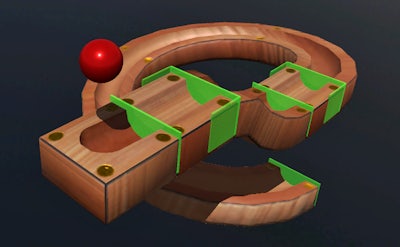
Get ready to unleash your creativity and problem-solving skills in Marble Run, the ultimate 3D building simulation game from PlayHop. In this addictive and educational experience, you'll design and build your own intricate marble runs using a variety of track pieces.

Using the intuitive controls, you'll craft a path for the marble to navigate from top to bottom, and as you build, you'll learn about physics and logic in a fun and interactive way.

Marble Run Gameplay

But it's not just about building – it's about strategy. As you progress, you'll need to think critically about the marble's path and how to overcome obstacles, making Marble Run a true test of your problem-solving skills.

Master the Controls and Build Your Dream Marble Run

  • Use the left mouse button to build and create your marble run.
  • Hit Ctrl to get an overview of your creation and spot any potential problems.
  • Use Z to move the camera around the surface, giving you a more detailed view of your build.
  • Turn the mouse wheel to zoom in and get a closer look at your track pieces.
  • Use the arrow keys to move the camera forward, back, left, and right, giving you more flexibility when building.

With its challenging gameplay and rewarding experience, Marble Run is the perfect game for anyone who loves building, physics, and logic. Try it out today and discover why PlayHop is the go-to destination for gamers of all ages and skill levels.

Don't settle for boring games – build your own marble run and experience the thrill of creation with Marble Run from PlayHop. Play Now and discover a world of endless possibilities!

At PlayHop, we're passionate about creating games that challenge and entertain. With a wide range of titles to choose from, you're sure to find something that suits your taste. Visit our homepage to learn more about our games and the PlayHop community: PlayHop

Instructions:

Controls

  • Use the left mouse button to build
  • Use Ctrl to get an overview
  • Use Z to move the camera around the surface
  • Turn the mouse wheel to zoom in
  • Use the arrow keys to move the camera forward, back, left, and right
Customise Consent Preferences Close

We use cookies to help you navigate efficiently and perform certain functions. You will find detailed information about all cookies under each consent category below.

The cookies that are categorised as "Necessary" are stored on your browser as they are essential for enabling the basic functionalities of the site.

Always Active

Necessary cookies are required to enable the basic features of this site, such as providing secure log-in or adjusting your consent preferences. These cookies do not store any personally identifiable data.

Functional cookies help perform certain functionalities like sharing the content of the website on social media platforms, collecting feedback, and other third-party features.

Analytical cookies are used to understand how visitors interact with the website. These cookies help provide information on metrics such as the number of visitors, bounce rate, traffic source, etc.

Advertisement cookies are used to provide visitors with customised advertisements based on the pages you visited previously and to analyse the effectiveness of the ad campaigns.

We also use third-party cookies that help us analyse how you use this website, store your preferences, and provide the content and advertisements that are relevant to you. These cookies will only be stored in your browser with your prior consent.

You can choose to enable or disable some or all of these cookies but disabling some of them may affect your browsing experience.