Cubes 3D – the 3‑D Tetris twist that flips logic on its head
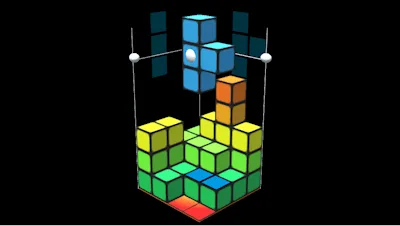
Cubes 3D takes the classic Tetris feel and throws it into a full‑blown three‑dimensional arena. One player, endless layers, and a brain‑teasing logic puzzle that rewards daring top‑down stacks. Build high, clear fast, and watch the score skyrocket as each completed layer adds a massive bonus. If you love the precision of Tetris but crave a fresh spatial challenge, this is the title that makes every move count.
Mechanics
Pick up the mouse, tap the keys, and start shaping the floating cubes. The interface is built for instant mastery, yet deep enough to keep you grinding.
- Controls (keys can be reassigned) New piece: click two times
- Move slowly piece down: drag white ball down
- Move piece: hold right mouse button on blue piece and drag
- Rotate piece: hold left mouse button and drag
- Rotate camera: hold right mouse, not on blue piece and drag
- Use Keypad keys 1-9 to move
- Use QWEASDZC to rotate
- Space bar new piece
Strategy
Success hinges on three core habits: vision, timing, and risk assessment. First, rotate the camera to spot gaps before they appear—what looks like a clean floor from one angle can hide a looming void from another. Second, prioritize clearing the highest layers; the score multiplier spikes dramatically when you finish a top‑level plane. Third, balance speed with precision. Dragging a piece slowly lets you fine‑tune its fit, but a rapid drop can lock in a combo before the board fills up. Master the keypad shortcuts for quick lateral shifts, then switch to the QWEASDZC cluster for swift rotations. As you progress, the puzzle density rises, forcing you to think three moves ahead—exactly the kind of logic workout seasoned Tetris fans crave.
Ready to stack, rotate, and dominate? Cubes 3D awaits on PlayHop. Jump in, crush those layers, and prove you’ve got the logic to own the 3D grid.