Your Ad Here
Click to play
x
Controls

Controls

Keyboard and Mouse

  • (W)(A)(S)(D) / (Arrowkeys) : Drive
  • (Space) : Nitro
  • (Shift) : Drift
  • Double-Tap (Shift): U-Turn
  • (Z) / (LMB) : Fire Primary
  • (X) / (RMB) : Fire Secondary
  • (F) / (MMB) : Use Special Weapon
  • (C) : Look Behind
  • (1) - (0): Dialog Hotkeys
  • Hold (`) : Show Dialog Wheel
  • (V) : HUD Toggle
  • (ESC) / (P) : Pause

Gamepad

  • (Left stick) : Steer
  • (Right trigger) : Accelerate
  • (Left trigger) : Decelerate
  • (A) : Nitro
  • (B) : Drift
  • Double-Tap (B) : U-Turn
  • (Right shoulder) : Fire Primary
  • (Left shoulder) : Fire Secondary
  • (Y) : Use Special Weapon
  • (Right stick down) : Look Behind
  • Hold (D-Pad Up) : Show Dialog Wheel
  • (D-Pad Down) : HUD Toggle
  • (Start) : Pause
Burnin' Rubber Multiplayer

Burnin' Rubber Multiplayer

Burnin' Rubber Multiplayer
Click to play
This game is not available on mobile.
rotate phone

Burnin' Rubber Multiplayer – High-Octane Chaos for the Crew

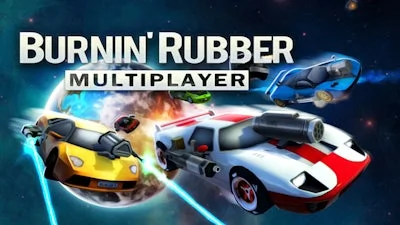
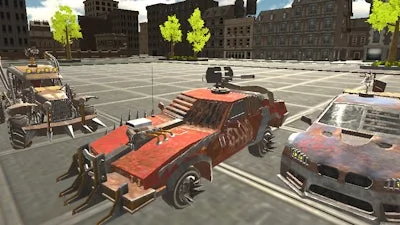
Imagine a 3D arena where every turn could mean a kill, every boost could shatter a rival car, and the only rule is to dominate. That’s the heartbeat of Burnin' Rubber Multiplayer. It throws you into a relentless car combat showdown, letting you blast, drift, and out‑maneuver friends in real‑time. If you love watching metal crumble and hear the roar of engines, this is the multiplayer playground you’ve been waiting for.

Mechanics

Master the controls, then let the chaos unfold. Whether you’re on keyboard or gamepad, every button is mapped for maximum impact.

  • Keyboard & Mouse – Drive: (W)(A)(S)(D) / (Arrowkeys)
  • (Space) – Nitro
  • (Shift) – Drift (Double‑Tap)
  • (Shift) – U‑Turn
  • (Z) – U‑Turn
  • (LMB) – Fire Primary
  • (X) – Fire Primary
  • (RMB) – Fire Secondary
  • (F) – Fire Secondary
  • (MMB) – Use Special Weapon
  • (C) – Use Special Weapon
  • (1) – Look Behind
  • (0) – Look Behind
  • Hold (`) – Show Dialog Wheel
  • (V) – HUD Toggle
  • (ESC) – HUD Toggle
  • (P) – Pause
  • Gamepad – Steer: Left stick
  • Right trigger – Accelerate
  • Left trigger – Decelerate
  • (A) – Nitro
  • (B) – Drift (Double‑Tap)
  • (B) – U‑Turn
  • (Right shoulder) – U‑Turn
  • (Left shoulder) – Fire Primary
  • (Y) – Fire Secondary
  • (Right stick down) – Use Special Weapon
  • Hold (D‑Pad Up) – Look Behind
  • (D‑Pad Down) – Show Dialog Wheel
  • (Start) – Pause
Burnin

Strategy

Winning isn’t just about raw speed; it’s about timing, positioning, and weapon mastery. Start by picking a car that meshes with your playstyle—heavy hitters absorb damage, while light speedsters zip around corners. Use the U‑Turn to slip behind unsuspecting opponents, then unleash a primary fire blast to cripple their chassis. Nitro bursts should be saved for escape routes or surprise attacks; spamming them leaves you vulnerable.

Map awareness is critical. The arena is littered with destructible objects that can be turned into shields or traps. Lead foes into a crater, then detonate a secondary weapon to finish them off. Keep an eye on the special‑weapon cooldown—timing a well‑placed rocket while an enemy is drifting can instantly destroy a car.

Team play elevates the experience. Coordinate nitro rushes, set up cross‑fire zones, and share weapon pickups. The more you communicate, the faster you’ll dominate the leaderboard. Progression unlocks slick paint jobs, upgraded armor, and new arsenal. Each unlock feels like a badge of honor, pushing you to keep grinding for that perfect 3‑car combo.

Ready to smash, drift, and destroy with friends? Grab your controller, fire up Burnin' Rubber Multiplayer, and prove you’re the last car standing. Burnin' Rubber Multiplayer is live on PlayHop—join the chaos now.

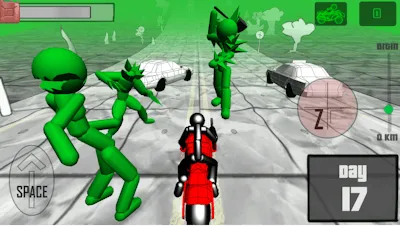
Instructions:

Controls

Keyboard and Mouse

  • (W)(A)(S)(D) / (Arrowkeys) : Drive
  • (Space) : Nitro
  • (Shift) : Drift
  • Double-Tap (Shift): U-Turn
  • (Z) / (LMB) : Fire Primary
  • (X) / (RMB) : Fire Secondary
  • (F) / (MMB) : Use Special Weapon
  • (C) : Look Behind
  • (1) - (0): Dialog Hotkeys
  • Hold (`) : Show Dialog Wheel
  • (V) : HUD Toggle
  • (ESC) / (P) : Pause

Gamepad

  • (Left stick) : Steer
  • (Right trigger) : Accelerate
  • (Left trigger) : Decelerate
  • (A) : Nitro
  • (B) : Drift
  • Double-Tap (B) : U-Turn
  • (Right shoulder) : Fire Primary
  • (Left shoulder) : Fire Secondary
  • (Y) : Use Special Weapon
  • (Right stick down) : Look Behind
  • Hold (D-Pad Up) : Show Dialog Wheel
  • (D-Pad Down) : HUD Toggle
  • (Start) : Pause
Customise Consent Preferences Close

We use cookies to help you navigate efficiently and perform certain functions. You will find detailed information about all cookies under each consent category below.

The cookies that are categorised as "Necessary" are stored on your browser as they are essential for enabling the basic functionalities of the site.

Always Active

Necessary cookies are required to enable the basic features of this site, such as providing secure log-in or adjusting your consent preferences. These cookies do not store any personally identifiable data.

Functional cookies help perform certain functionalities like sharing the content of the website on social media platforms, collecting feedback, and other third-party features.

Analytical cookies are used to understand how visitors interact with the website. These cookies help provide information on metrics such as the number of visitors, bounce rate, traffic source, etc.

Advertisement cookies are used to provide visitors with customised advertisements based on the pages you visited previously and to analyse the effectiveness of the ad campaigns.

We also use third-party cookies that help us analyse how you use this website, store your preferences, and provide the content and advertisements that are relevant to you. These cookies will only be stored in your browser with your prior consent.

You can choose to enable or disable some or all of these cookies but disabling some of them may affect your browsing experience.